
GOOMBO: A Local Usage Tracker (and Soon, an AI That Nags You)
I built a personal usage dashboard in a few hours with Codex—macOS + Android + Firefox, all local. Here’s how it works and what’s next: an AI that messages me when I’m getting distracted.
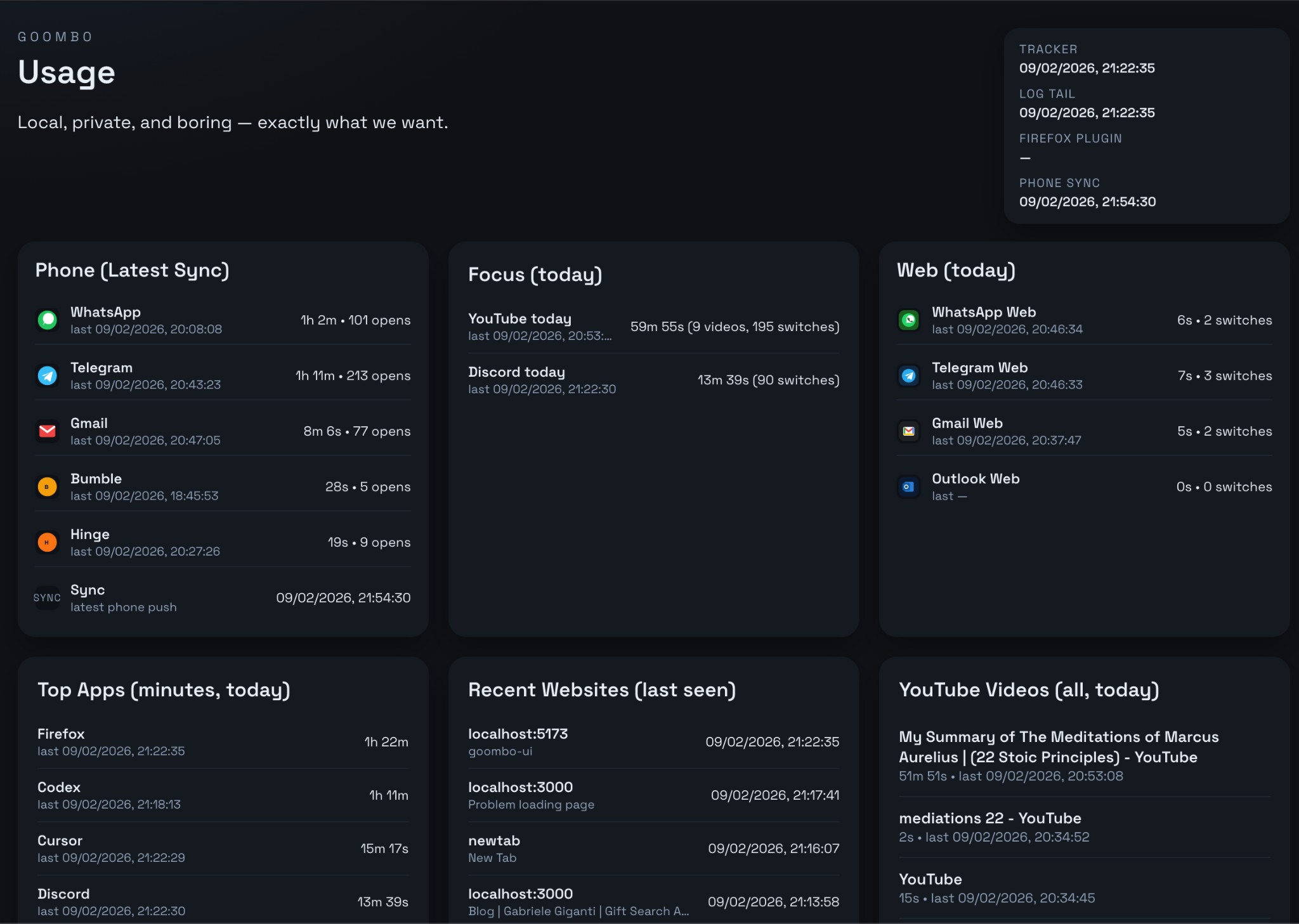
I wanted a boring, local view of where my time goes: which apps, which sites, how much YouTube, how often I flip between Discord and the editor. No cloud, no account—just a dashboard that reads from files on my machine. So I built GOOMBO in a few hours with Codex, and the repo lives at workbench/goombo. Here’s what’s in it and what I’m doing next: an AI that messages or notifies me when it thinks I’m getting distracted.
What GOOMBO looks like
The frontend is a single-page dashboard: dark theme, grid of cards, auto-refresh every 5 seconds. Tagline: “Local, private, and boring — exactly what we want.”
At the top you get a status strip: Tracker (last rollup update), Log tail (last raw log line), Firefox plugin (last time the extension pushed active tab/URL), and Phone sync (last time the Android app pushed its usage dump). Everything else is derived from the same local data.
Components
1. macOS tracker (track_usage.py)
A Python script that runs in the background (or via launchd). Every second it checks:
- Frontmost app and window title — via AppleScript /
lsappinfo, so it knows “Firefox”, “Cursor”, “Discord”, etc. - Active browser URL — for Safari and Arc it uses AppleScript; for Firefox it reads a JSON file that the extension writes (see below).
- Domain — derived from the URL (or from window title for Firefox when URL isn’t available).
- YouTube / audible state — from the Firefox bridge: which tab is audible, muted, and the URL/title of the “audible” tab (often a YouTube video).
When the frontmost app or “state” (app + URL/domain, etc.) changes, it:
- Adds the elapsed time to a rollup (
data/rollup.json: per-app and per-domain seconds, plusyoutube_seconds). - Appends a log line to
data/usage_log.jsonlwith timestamp, app, domain, window title, active URL, audible URL/title, andsample_seconds.
So you get both a live rollup and a full event log. All paths are local (e.g. under ~/Library/Application Support/goombo/ when run as an agent).
2. Firefox extension (firefox-extension/)
Firefox doesn’t expose the current tab’s URL to AppleScript, so the tracker can’t see it on its own. The extension fixes that:
- Native messaging — a small host (
firefox_url_host.py) runs on the Mac; the extension connects to it and sends the active tab’s URL and title, plus which tab is audible and its URL/title. - The host writes this to a JSON file that
track_usage.pyreads whenever the frontmost app is Firefox. - The extension updates on tab switch, tab update, and on a 5s interval.
That’s how “Recent Websites” and “YouTube Videos (all, today)” get real URLs and titles instead of just “Firefox”.
3. Android app (android-tracker/)
An Android app that tracks usage (and optionally notifications) and periodically pushes a summary to the Mac. The payload lands as something like data/phone_latest.json with:
- Per-app time and open counts for a fixed set of packages (WhatsApp, Telegram, Gmail, Outlook, Bumble, Hinge, Instagram, etc.).
The UI shows this in the Phone (Latest Sync) card: last sync time plus each app’s last used time, total time, and number of opens. So you see both “1h 2m” and “101 opens” for WhatsApp—useful for distraction signals.
4. Goombo UI (goombo-ui/)
A small React (Vite) app that:
- Calls local APIs (via a thin backend or direct file serving) to read
rollup.json, the tail ofusage_log.jsonl,phone_latest.json, and the Firefox active JSON. - Filters log rows to “today” and aggregates them in the browser.
Cards:
- Phone (Latest Sync) — list of configured phone apps with time and opens from the latest push.
- Focus (today) — YouTube total time, video count, and “switches” (how many times you switched into YouTube); same for Discord (time + session switches). This is the main “distraction” surface.
- Web (today) — WhatsApp Web, Telegram Web, Gmail, Outlook: time and “switches” per domain.
- Top Apps (minutes, today) — desktop apps by total time (e.g. Firefox, Codex, Cursor, Discord).
- Recent Websites (last seen) — last N distinct URLs/domains with timestamp.
- YouTube Videos (all, today) — per-video time and last active, using audible URL/title from the Firefox bridge.
- Status and Data Files — so you can see refresh interval and open the raw JSON/JSONL files.
All computed in the frontend from the log and rollup; no database, no server state.
5. Daily summary (daily_summary.py)
A separate script that reads usage_log.jsonl, filters to today, aggregates by app and domain, and can write summaries (e.g. into data/daily/). Useful for “how did today look?” and for feeding an AI later.
Data that’s ready for an AI
The dashboard already exposes the right knobs for distraction logic:
- Time — per app, per domain, per YouTube video.
- Switches — how often you entered YouTube or Discord (or a web app) in a session.
- Opens — from the phone: how many times you opened WhatsApp, Telegram, etc.
- Recency — last seen per app/domain/video.
So an AI can reason about: “Long YouTube session + many switches + Discord popping up = likely distracted,” or “Lots of Codex/Cursor, little social = focused.”
Next step: AI that messages or notifies when you’re distracted
What I want next (not done yet): an AI layer that:
- Consumes the same inputs: rollup, log tail, phone latest, maybe daily summary.
- Decides when I’m “getting distracted too much” — e.g. rules or a small model on thresholds (YouTube time, switch count, mix of productive vs. social apps).
- Acts by messaging me or sending a notification (Telegram, Discord, macOS notification, etc.) with a nudge or a short summary.
Possible pieces:
- Input pipeline — a small service that reads the same JSON/JSONL and emits a “state” snapshot (e.g. every 1–5 minutes) with today’s totals, last 30m activity, switch counts.
- Policy or model — either rule-based (“if YouTube > 45 min and switches > 50 in the last hour → nudge”) or a tiny classifier / LLM call: “Given this usage summary, is this person likely distracted? If yes, suggest a one-line nudge.”
- Output — webhook to Telegram/Discord, or local macOS notification, or both. Optional: “snooze for 30 minutes” so the AI doesn’t spam.
The Focus (today) card is the main signal (YouTube + Discord time and switches); Phone (Latest Sync) and Web (today) add context (messaging apps); Top Apps and YouTube Videos help distinguish “working in the browser” from “doom-scrolling.” I’ll likely start with simple rules and a single notification channel, then add a bit of “fun” (e.g. different nudge styles or a daily summary in the same pipeline).
Summary
- GOOMBO = local usage tracker: macOS script + Firefox extension + Android app + React dashboard, all feeding from local files.
- Built in a few hours with Codex; repo at
workbench/goombo. - Components:
track_usage.py(sample frontmost app/URL, write rollup + log), Firefox extension (bridge URL/audible tab to the tracker), Android app (phone usage push), goombo-ui (cards and status), daily_summary.py (daily aggregates). - Next: add an AI that uses this data to detect “too distracted” and message or notify me—with room for more fun later.
If you want to try it yourself, clone the repo, point the UI at your own data/ and Firefox/phone outputs, and adjust the paths in the README for your machine.